
Torrent moderation
Every uploaded torrent travels through a four-state moderation pipeline. The state lives on torrents.moderation_status:
| State | Visible to | Editable by | Notes |
|---|---|---|---|
pending | uploader + staff | uploader (free), staff (any) | Default state for any non-bypass upload. Hidden from public listings. |
accepted | everyone | uploader, staff | Public. A non-bypass edit by the uploader auto-reverts the row to pending. |
changes_requested | uploader + staff | uploader (free), staff | A moderator asked for edits. Saving an edit auto-resubmits → pending. |
rejected | uploader + staff | frozen for everyone | Only /api/mod/torrents/:hash/reset can move the row out. Re-uploading the same hash is blocked. |
Bypass
Staff (admin / moderator) and members carrying any role with canUploadWithoutModeration: true skip the queue entirely — their uploads land directly as accepted. The flag is consulted on every upload + edit through userCanBypassModeration() (Redis-cached for 5 minutes; the cache is invalidated when role membership or the role flag itself changes).
The discussion thread
Every status change emits a row in torrent_moderation_messages. The same table also accepts free-form chat posts from either the uploader or staff — useful for clarification questions before a moderator commits to a status change.
Visibility:
- The uploader of the torrent (read/write on their own torrent's thread).
- Any moderator/admin (read/write on every thread).
Anyone else gets a flat 404 on the thread endpoint — same response as a non-existent hash, so a probe can't even confirm a thread exists.
UI surface
Torrent detail page
The badge row above the title carries the current status (PENDING REVIEW, CHANGES REQUESTED, REJECTED). The badge is hidden once the row is accepted.
Below the swarm card, a collapsible "File · Moderation" panel shows the conversation thread. The banner is colour-coded per status (amber / sky / red), opens on click, and exposes a composer + the action buttons relevant to the current state:
- Approve — moves to
accepted. Optional message. - Request changes — moves to
changes_requested. Note required (the user has to know what to change). - Reject — moves to
rejected. Reason required (transparency). - Re-open to pending — only visible from
rejected. Note required.
Members see the same panel but only the Send reply button — no status change actions.
When a torrent is in a non-final state (pending or changes_requested) the panel renders at the top of the page instead of the bottom, so the uploader sees the moderator's instructions without scrolling past every byte of metadata.
Admin queue (/mod/pending)
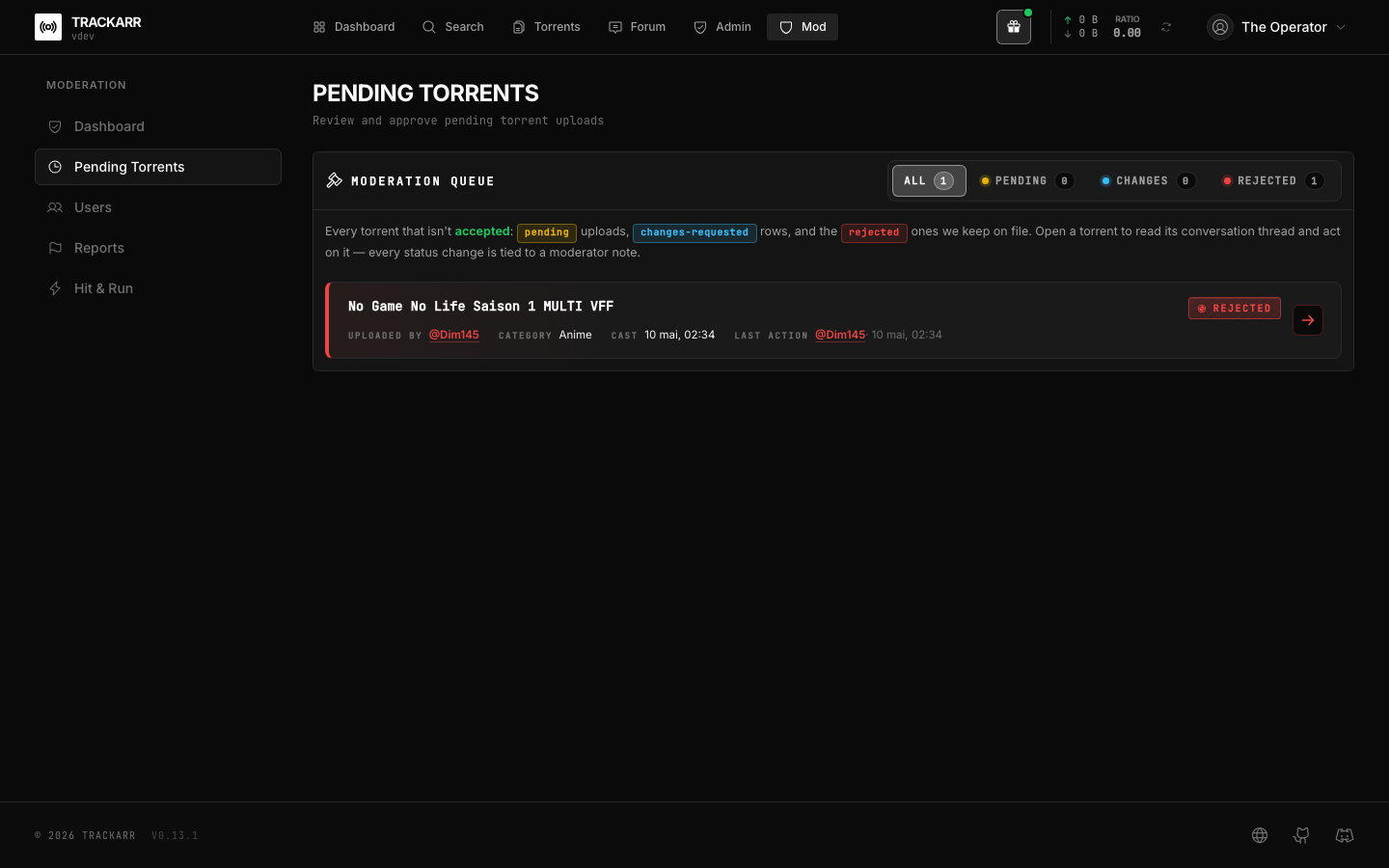
The queue lists every row whose status isn't accepted. A segmented filter (All / Pending / Changes / Rejected) splits the buckets, each with its own colour rail. Clicking a row opens its detail page where the panel takes over.
Staff don't act from the queue itself — every status change is tied to a moderator note that lives on the torrent page, not in a one-shot action button. This keeps the audit trail in one place.
Re-upload of a rejected info-hash
The torrents.info_hash column is UNIQUE. A rejected row is therefore impossible to re-insert. The upload endpoint (POST /api/torrents) detects this case explicitly:
HTTP 403 Forbidden
"This torrent has previously been rejected by moderation. Re-uploading it is not allowed."
To re-open a rejected row a moderator must explicitly call /api/mod/torrents/:hash/reset and write a note. The dedicated reset endpoint is the only path out of rejected — even a direct PATCH on the torrent metadata is blocked while the row is frozen, both for the uploader and for staff.
Edit auto-revert
When a non-bypass member edits an accepted or changes_requested row, the patch endpoint (/api/torrents/:hash):
- Applies the field changes.
- Sets
moderation_status = 'pending'. - Posts a system message in the thread:
Resubmitted for review after edits.— when the row waschanges_requested.Edits made; returning to the moderation queue.— when the row wasaccepted.
Bypass-flagged users (admins, mods, members with the role flag) keep the current status when they edit — they're trusted to publish without re-review.
API surface
| Method | Path | Auth | Notes |
|---|---|---|---|
GET | /api/torrents/:hash/moderation/messages | thread | Returns { status, messages }. 404 if not allowed. |
POST | /api/torrents/:hash/moderation/messages | thread | Free-form reply. No status change. |
POST | /api/mod/torrents/:hash/approve | mod | Optional message. |
POST | /api/mod/torrents/:hash/request-changes | mod | Required message. |
POST | /api/mod/torrents/:hash/reject | mod | Required message. |
POST | /api/mod/torrents/:hash/reset | mod | Required message. Body: { to: 'pending' | 'accepted' | 'changes_requested' } (default pending). |
thread = uploader of the row OR any staff member.
Reports
Users can flag four kinds of target through the report form (POST /api/reports):
targetType | What gets reported |
|---|---|
torrent | A .torrent row (any moderation status). |
user | Another user's account (rules / behaviour). |
post | A forum post. |
comment | A torrent-detail-page comment. |
The payload requires a reason (10–500 chars) and accepts an optional details field (up to 2000 chars). Self-reports on user targets are rejected at the route — there's no honest use-case.
Every accepted report:
- inserts a row in
reportswithstatus='pending', - fans a
new_report_filednotification out to every staff recipient (vialistStaffRecipients()) — the reporter is excluded from the broadcast, - lands the report in the queue at
/mod/reports.
Resolution
Staff resolve from /mod/reports. The PUT (/api/admin/reports/:id) accepts:
{
  "status": "resolved" | "dismissed",
  "resolution": "optional note (≤500)",
  "banDuration": "none" | "1d" | "7d" | "1m" | "1y" | "permanent",
  "banReason": "optional, defaults to the report's reason"
}
Both outcomes notify the reporter through the report_actioned notification, with the resolution note carried inline — so a report never feels like it vanished into a void.
banDuration is only meaningful when targetType = 'user' and status = 'resolved'. See the dedicated Reports guide for the full ban-on-resolution flow.
Cascade: report on a torrent
When a torrent report is resolved, the moderator's decision cascades automatically:
- The torrent transitions to
rejectedvia the sharedtransitionStatushelper (same path a manual reject would take). - The moderation-thread message is composed from the report reason + the optional moderator note, prefixed
Report accepted:so the audit trail is unambiguous. - The uploader receives an
upload_rejectednotification — identical inbox semantics to a manual reject. - The uploader's auto-role rules are re-evaluated (
reevaluateUserRole) since theirapprovedUploadscount just dropped.
This saves the moderator a round-trip and keeps the audit trail honest: the moderation thread on the torrent shows the rejection chained to the report.
Lifecycle states
                       POST /api/reports
                              │
                              ▼
                          ┌────────┐
                          │ pending│
                          └───┬────┘
              ┌───────────────┴───────────────┐
              │ PUT status=resolved           │ PUT status=dismissed
              ▼                               ▼
         ┌──────────┐                    ┌─────────┐
         │ resolved │                    │dismissed│
         └─────┬────┘                    └────┬────┘
               │                              │
       (torrent → rejected if applicable)     │
               │                              │
               └───────► notify reporter ◄────┘
                         (report_actioned)
reports.resolvedBy and reports.resolvedAt record the staff actor and the timestamp so an admin can audit who closed what.
Permissions
| Surface | Who can act |
|---|---|
POST /api/reports | Any authenticated user (rate-limited as a mutation). |
GET /api/admin/reports | Moderators + admins. |
PUT /api/admin/reports/:id | Moderators + admins. |
Timed bans & auto-unban
The user is_banned flag carries a sibling banned_until timestamp. A NULL value means permanent (the historical behaviour); a future timestamp means the ban auto-lifts when the cron sweeps past it. The lift is also enforced lazily at login, Torznab, and the announce path so a user trying to sign in milliseconds after their ban expires isn't bounced because the cron hasn't ticked yet.
The dedicated Reports guide covers the full ban lifecycle, including the bounce-screen reason text and the admin-tunable timeout setting.
Anti-cheat
A separate moderation surface at /mod/anti-cheat handles suspicious announces flagged by the Go tracker. Three heuristics — impossible velocity, upload to an empty swarm, unknown peer_id signature — feed the queue; staff triage each flag manually. See the Anti-cheat guide for the detectors, severity levels, and review workflow.
Upload requests
/requests is a community bounty board where users post specific upload wishes and stake bonus points as a reward. It isn't a moderation surface per se (requests live or die on user-to-user action), but staff have soft-delete on the discussion threads attached to each request. See the Upload Requests guide.