
Two-Factor Authentication
Trackarr ships with two complementary second-factor methods on top of the Zero-Knowledge SRP login:
- TOTP — 6-digit code from any authenticator app (Google Authenticator, Authy, 1Password, Bitwarden, …) plus a one-time recovery-code batch.
- WebAuthn passkeys — hardware-backed credentials (Touch ID, Windows Hello, YubiKey, etc.) registered through the browser.
A user can enable either, both, or neither. When at least one is configured the SRP login path mints a short-lived challenge token instead of opening a session; the client trades it for a session by submitting a TOTP code, a recovery code, or a WebAuthn assertion.
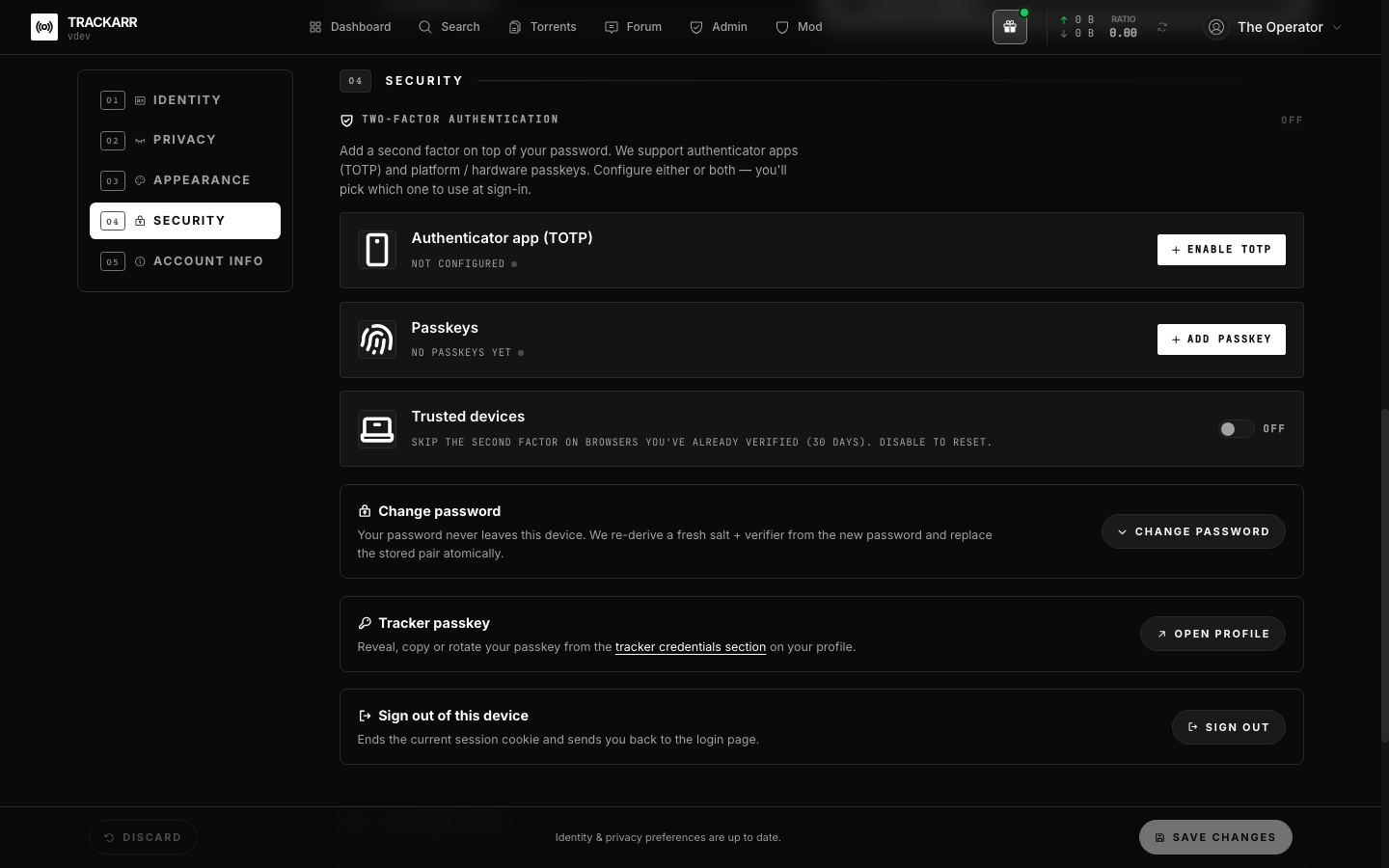
Enrolling
Each user manages their own factors from /settings#security:
- TOTP — scan the QR, type the 6-digit code, then save the recovery codes shown once. The codes are 10-character base32 (without
0/1/I/Oto avoid ambiguity), formattedXXXX-XXXXXX. They are persisted as SHA-256 hashes only; the cleartext is never re-displayed. - Passkey — click Add a passkey, follow the browser prompt, give the credential a friendly name (e.g. "iPhone 15", "YubiKey 5C"). You can register as many as you like.
TIP
The user can rename or revoke individual passkeys, regenerate the recovery code batch, or fully disable TOTP from the same screen.
Trusted devices (optional)
When a user opts in (Trust this browser toggle in settings), completing a 2FA challenge also issues a long-lived trusted-device cookie (sha-256-hashed token, 30-day TTL). The next login from the same browser skips the 2FA step entirely. The toggle is off by default so the high-security stance stays in place for users who don't ask for the convenience.
The user can list and revoke individual devices from /settings#security ("Trusted devices" tab).
Forced enrolment (admin)
/admin/settings exposes a Force 2FA setting with three values:
| Value | Effect |
|---|---|
off | Default. 2FA is opt-in. |
staff | Admins and moderators must enrol before they can use the app. |
all | Every user must enrol before they can use the app. |
When the scope catches a user that hasn't enrolled, the global auth middleware redirects every page navigation to /settings#security until at least one factor is configured.
Sensitive operations — A+C re-auth
Disabling TOTP, regenerating recovery codes, deleting a passkey, and any other "remove the second factor" path are gated by both:
- Gate A — the session must have completed a full SRP + 2FA login within the last 10 minutes (a Redis stamp at
auth:fresh:{sessionId}). - Gate C — the request itself must include a fresh 2FA challenge (a TOTP code or a recovery code).
A stolen idle session token alone can therefore never strip the second factor. The user can re-stamp gate A by re-running the login flow with their password.
Storage notes
users.totp_secret— base32 secret used byotplib(SHA-1 / 6 digits / 30s window, ±1 step drift). Encryption-at-rest is left to the operator's Postgres setup; the secret is useless without an active session anyway since SRP gates the account itself.recovery_codes.code_hash— SHA-256 of the cleartext, single-use. Burned codes leave aused_atrow instead of being deleted (audit trail of which code was redeemed).webauthn_credentials— base64url-encoded credential id, COSE public key, replay-counter (strict-monotonic), per-credential transports and friendly name.trusted_devices.token_hash— SHA-256 of the cookie token. Revocations cascade from the user viarevokeAllForUser(); an explicit cron purges expired rows.
Developer notes
apps/api/utils/twoFactor.ts— TOTP secret generation + verification, recovery-code batch (now built withcrypto.randomInt(...)to avoid the modulo-bias CodeQL flag), Redis-backed fresh-auth window, challenge token mint/consume.apps/api/utils/webauthn.ts— RP id / origin resolution, registration + authentication challenges in Redis.apps/api/utils/trustedDevices.ts— token issue / consume / revoke / purge helpers.apps/web/app/components/security/TwoFactorSection.vue— the user-facing settings panel.apps/web/app/components/security/TwoFactorLoginStep.vue— the post-SRP step rendered on the login page.